Landing Page Improvements
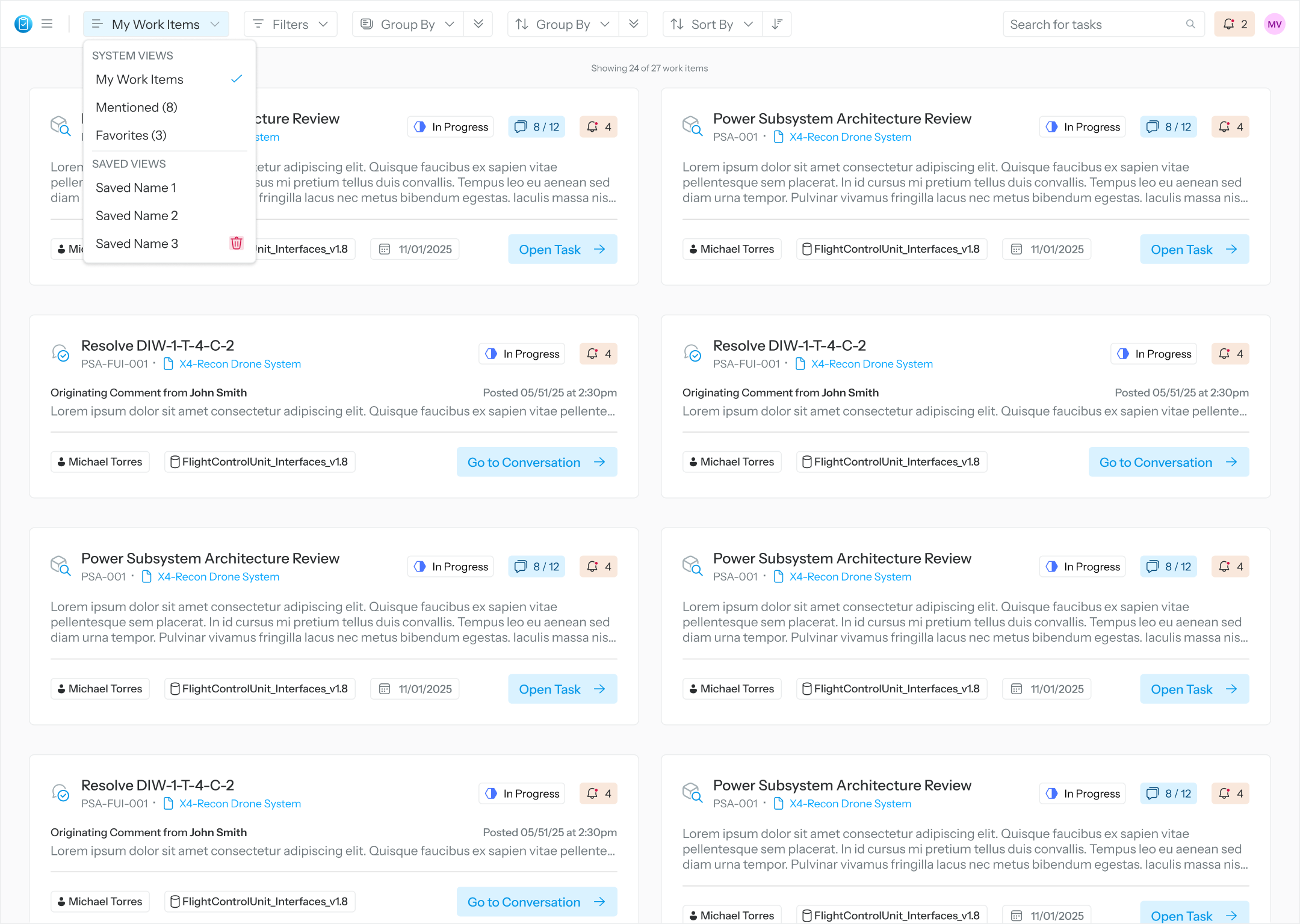
To further facilitate the participation of non-modeler/non-systems engineering users, the default Landing page (the first displayed page after user’s login) is now the user’s assigned tasks page. The assigned tasks page (formerly known as the user’s All-Tasks page) immediately provides the most pertinent Sidekick information the user cares about:
Assigned tasks and their
Description
Conversation counts
Task-related notifications
Co-owner(s) of task if applicable
Review object
Due date
User mention with summary
Overall Sidekick notifications
Tasks and user mentions are displayed in a grid layout with cards, which can be filtered by type (model review task/comment resolution task/user mention) and task status. A search utility is also available for filtering cards by keywords. The user may access their Task Execution page from a task card or mentioning Conversation from a User Mention card by clicking on the card navigational button.
The former (v1.0) Homepage is renamed “Summary page” which can be accessed from the Application menu.

Landing Page with grid of Tasks